If you no longer know the passcode for your iPad, iPad Air, iPad mini or iPad Pro, you can reset the tablet via your computer. Here’s how:
- Turn on your computer. It doesn’t have to be a Mac; you can also use a Windows PC but iTunes does have to be installed.
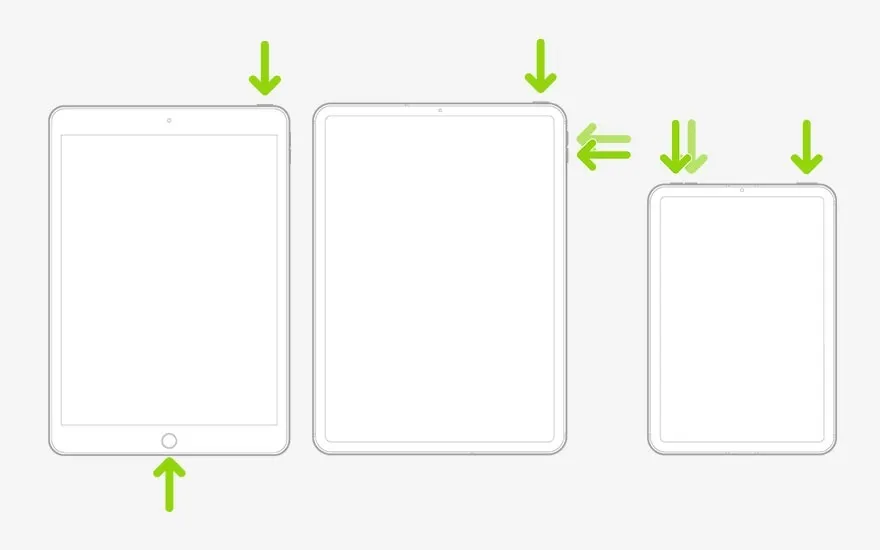
- Turn off your iPad. On an iPad with a Home button, press and hold the top button until the ‘Power off’ slider appears. If your iPad has no Home button, press and hold one of the volume buttons and the top button at the same time until you see the slider.
- Put your iPad into recovery mode. Do this by pressing and holding either the Home button or the top button while connecting the device to your computer. Don’t release the button until you see the recovery mode screen on your iPad.
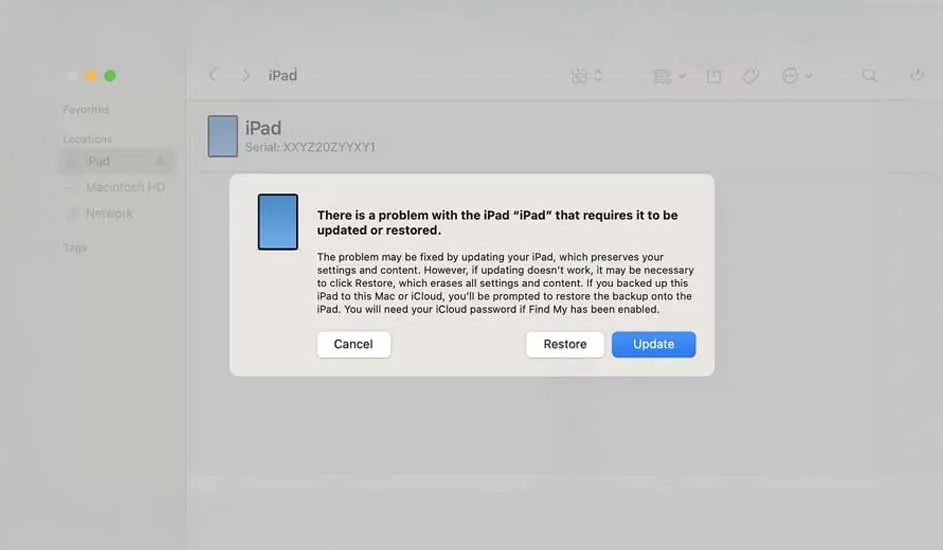
- Find your iPad in Finder or iTunes on the connected computer and choose ‘Restore’ in the pop-up on your screen.
- The computer will start the restore process. Once it’s complete, you can disconnect your iPad from the PC and set up the device again.