
MM logo white 1
MM logo red
Image description is not available

How to copy and paste on a Mac?

Luca31 AUGUST 2025
Hands typing on a slim Apple MacBook at a tidy desk, with notebooks, pencils in a pot, and soft daylight filtering through the window.

Need to copy text or insert an image into a document? Copy and paste is one of the simplest and most frequently used features on a Mac. Whether you're using keyboard shortcuts or Apple’s Universal Clipboard to transfer content between devices, we’ll show you exactly how it’s done.

Copy and paste on a Mac

A designer uses an Apple MacBook with a pen tablet at a neat desk, under a white lamp, with small succulents and pencils in a holder.

To copy and paste:

  1. Select the text or item.
  2. Press Command (⌘) + C to copy.
  3. Go to the desired location and press Command (⌘) + V to paste.

You can also right-click or tap with 2 fingers on the trackpad to open the context menu and choose Copy or Paste.
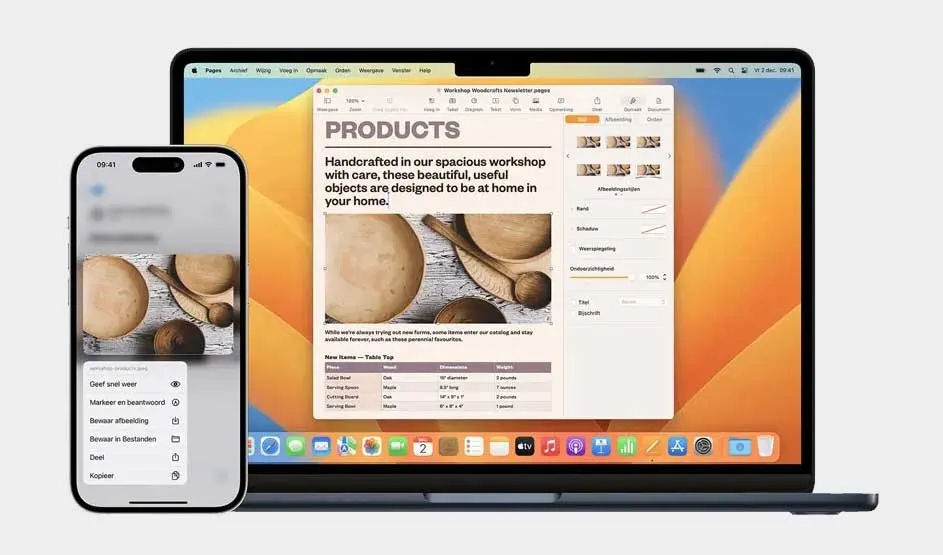

Universal Clipboard: copy and paste between Apple devices

An Apple MacBook and iPhone show continuity: a Pages layout on the Mac and the same wooden bowls image on the iPhone with share options.

Universal Clipboard allows you to copy content from one Apple device and paste it onto another – for example, copy text on your iPhone and paste it on your Mac.

To use it:

  1. Ensure all devices are signed in to the same iCloud account.
  2. Enable Handoff under System Settings -> General -> AirPlay & Handoff.
  3. Make sure Bluetooth and Wi-Fi are turned on.
  4. Copy content on one device and paste on another as usual.

How to take a screenshot with your MacBook?

Universal Clipboard not working? Try this

Two people chat while viewing a sleek dark‑blue Apple MacBook, its logo visible, in a softly lit studio with colour swatches on the wall.

If the feature isn’t working, try the following:

  1. Check that Bluetooth and Wi-Fi are both on.
  2. Make sure all devices are nearby (within 10 metres).
  3. Ensure you’re signed in to the same iCloud account.
  4. Restart your devices if needed.

If it still doesn't work, your Mac may be running an older macOS version. Universal Clipboard requires at least macOS Sierra.

Reset your MacBook

Our advice on copying and pasting on your Apple Mac

Two people at a counter use a mint Apple iMac as a shop till, browsing items and totals on screen, with a compact keyboard and mouse.

Copying and pasting is a quick and essential function on any Mac. Use keyboard shortcuts for speed, or Universal Clipboard to copy between your Mac, iPhone, and iPad. Just ensure your devices are properly connected and configured for a seamless experience.

Compare MacBooks

These articles might also be of interest to you