MM logo white 1
MM logo red
Image description is not available

How does WhatsApp work on your iPad or Android tablet?

Luca6 MAY 2026
Office scene with desk and lamp. A tablet is held in the foreground. A chair is visible in the background.

WhatsApp keeps you connected with friends and family anytime, anywhere. Have you just purchased a new iPad, iPad Air or Android tablet? On this page, discover step by step how to install and use WhatsApp via the official app, with clear instructions tailored to the type of tablet you’ve chosen.

How do you install WhatsApp on your tablet?

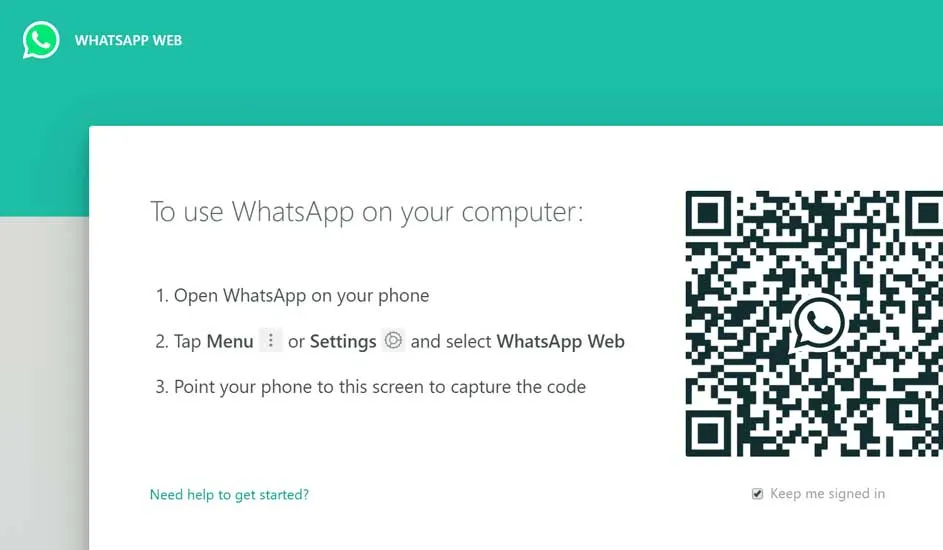
A screen displays instructions for using WhatsApp on a computer, alongside a QR code for scanning.

To start using WhatsApp on your tablet easily, you can begin with the web version of WhatsApp, namely WhatsApp Web. Open the browser on your tablet, visit the WhatsApp website and link your smartphone to your tablet, iPad or iPad Air by scanning the QR code. Prefer an app for direct access to your messages without having to visit the web page each time? Then install the WhatsApp app. Open the Google Play Store or App Store, search for ‘WhatsApp’ and select the official app. Tap ‘Install’, download and install the app. After opening, follow the steps to verify your phone number and allow WhatsApp access to your contacts and media files. This way you can chat and share media on your tablet, just like on your smartphone.

View all tablets

What are the differences between WhatsApp on an iPad and an Android tablet?

A tablet displays a website next to a plate with drink and cookies on a white wooden table.

WhatsApp on an iPad works differently than on an Android tablet. For iPad users, there is no official app in the App Store. Instead, you use WhatsApp Web via the browser, and for easy access you can add a shortcut to the webpage on your home screen. This method requires you to open WhatsApp via a linked smartphone. Android tablet users can install the official WhatsApp app directly from the Google Play Store, allowing them to use the app without a smartphone. However, there are limitations: you cannot use the app on a tablet and a smartphone at the same time. As an alternative to WhatsApp on Android tablets, the Tablet Messenger app provides access to WhatsApp Web for sending and receiving messages. More about how to take a screenshot on your iPad.

Meer over hoe je een screenshot maakt op je iPad

Linking WhatsApp on a tablet

To link WhatsApp to your Android tablet, iPad or iPad Air, use WhatsApp Web. Open the web browser on your tablet and go to the WhatsApp Web website. On your smartphone, open WhatsApp, tap the 3 dots in the top right (Android) or Settings (iPhone), and choose ‘WhatsApp Web’. Scan the QR code that appears on your tablet with your smartphone. Your WhatsApp conversations will now appear on your tablet.

WhatsApp on a tablet without a SIM

On a desk, a tablet is in front, a stylus in hand, plus a phone and laptop.

You can also use WhatsApp on your tablet without a SIM card, even without installing the app. Do this with WhatsApp Web, the online version of WhatsApp. Open the web version on your tablet, scan the QR code that appears with your smartphone, and link both devices. For Android tablets, both the official WhatsApp app and the Tablet Messenger app are options. To use WhatsApp on your iPad, simply link your smartphone. This allows you to view and send messages easily on the tablet, with the same account as on your phone.

Lees meer over welke tablet kopen

Can WhatsApp be used on a tablet and a phone at the same time?

Tablet displays a cloud and file icons on a blue screen. Hands hold the tablet. Background shows a tiled floor.

WhatsApp has expanded its features, allowing you to use the messaging service on multiple devices at the same time. Once the app is installed on your mobile, you can synchronise it with up to 4 other devices. An important improvement is that these additional devices no longer need to be continuously connected to your mobile phone. Previously, your mobile had to be on and have internet access to use WhatsApp on other devices, but that limitation has now been removed, offering greater flexibility and ease of use.

Lees meer over welke tablet het best bij jou past

Discover the best tablets for WhatsApp at MediaMarkt

Whether you have the latest iPad, iPad Air or an Android tablet, at MediaMarkt you will find the right tablet for all your communication needs. With our fast delivery options, you can collect your new tablet within 30 minutes of ordering at your local MediaMarkt store or have it delivered to your home the next day. Discover the tablet that suits you at MediaMarkt, and stay connected with friends and family via WhatsApp, wherever you are.

These articles may also be interesting for you